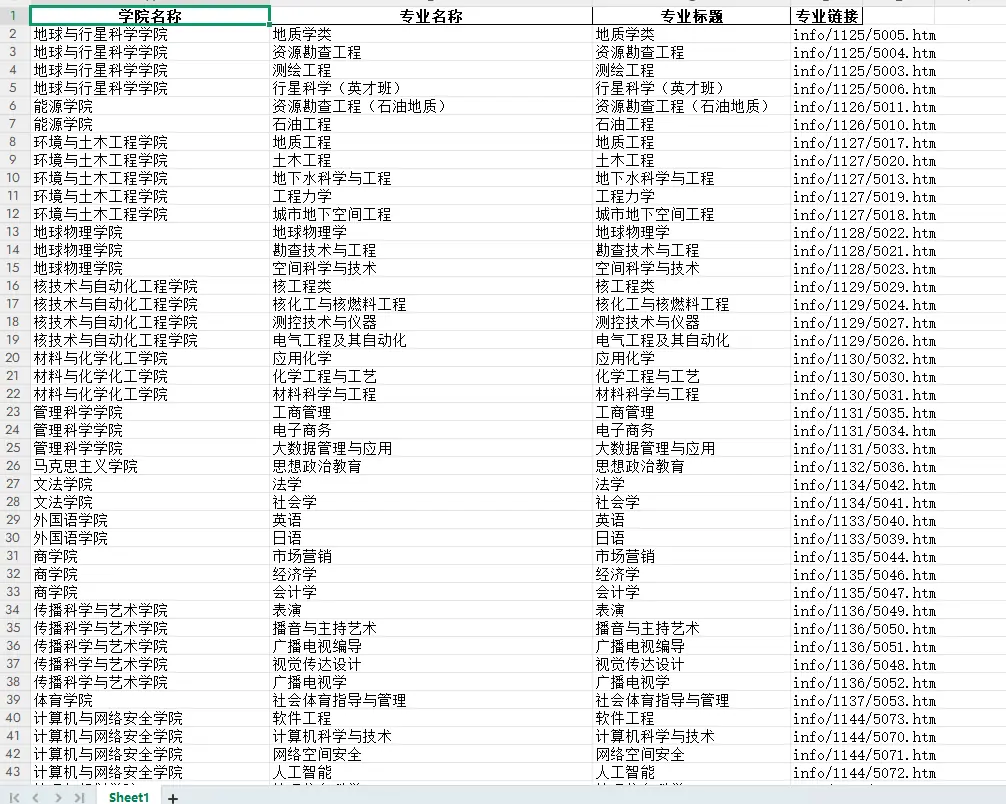
成都理工大学招生信息网专业信息自动化实战#
// 实战案例:成都理工大学招生信息网专业信息自动化实战
// 网址:https://www.zs.cdut.edu.cn/xyzy.htm
#概述
针对成都理工大学招生信息网(https://www.zs.cdut.edu.cn)的反爬机制设计的自动化爬取解决方案。采用DrissionPage控制Chromium浏览器,结合多种反反爬技术,有效绕过瑞数安全等高级防护措施。
#网页分析
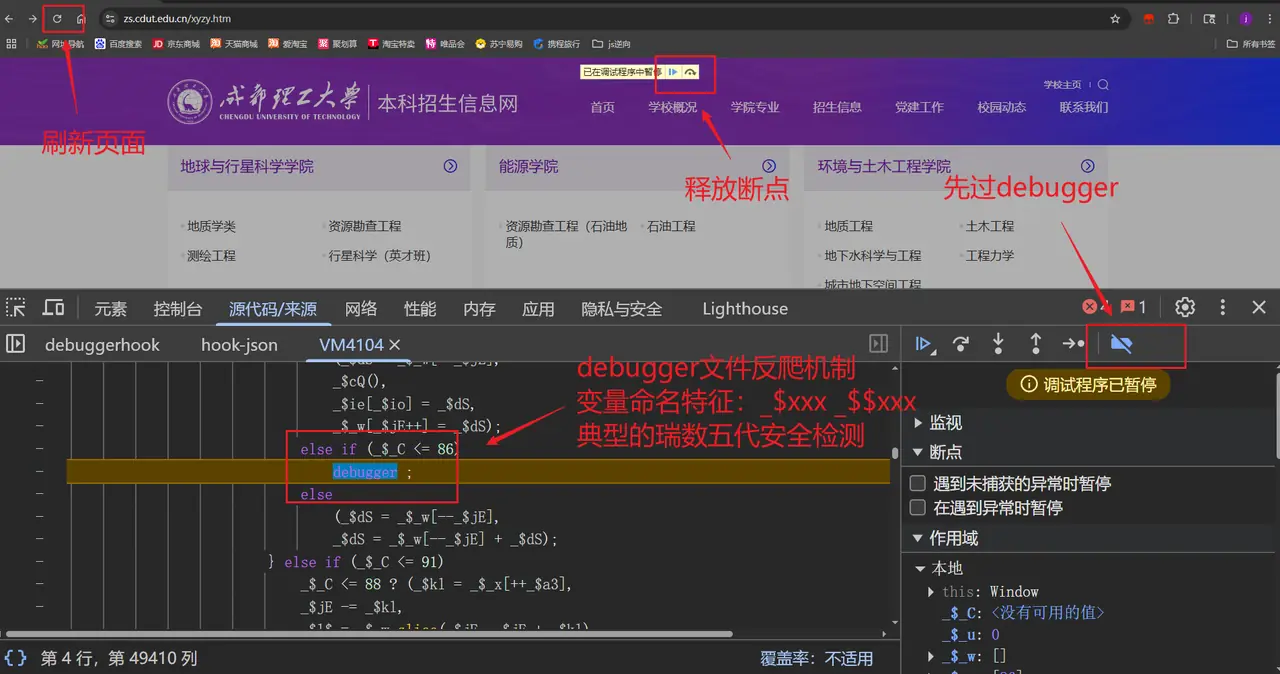
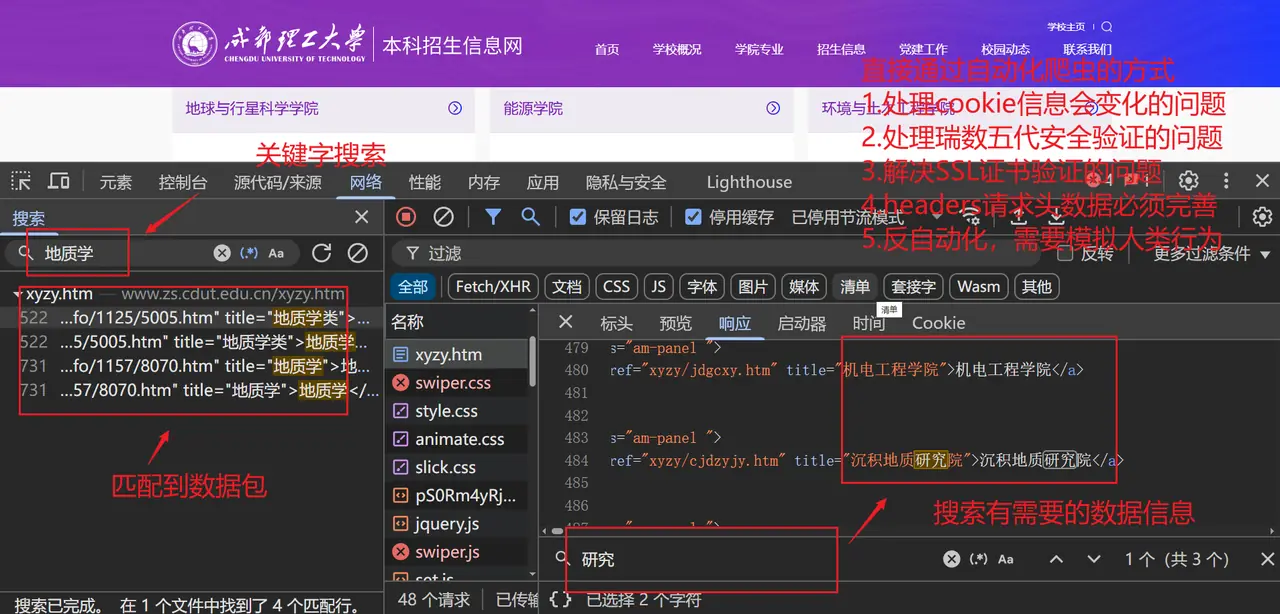
#问题
1.处理cookie信息会变化的问题
2.处理瑞数五代安全验证的问题
3.解决SSL证书验证的问题
4.headers请求头数据必须完善
5.反自动化,需要模拟人类行为
#技术架构
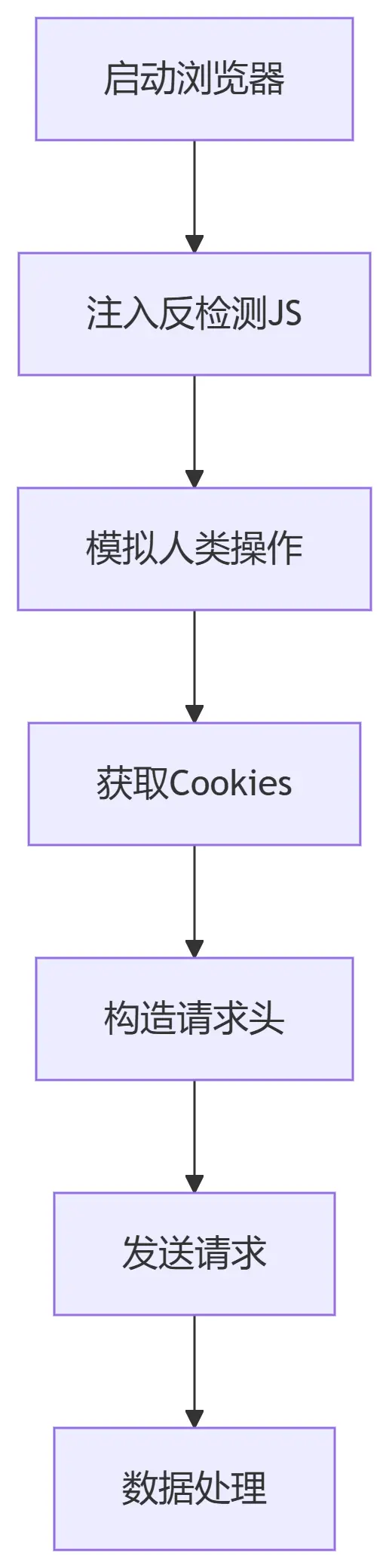
#核心功能实现
#1. 浏览器初始化配置
def __init__(self):
    self.browser = ChromiumPage(timeout=15)
    self.browser.set.window.max()  # 最大化窗口减少自动化特征
    self.target_url = "https://www.zs.cdut.edu.cn/xyzy.htm"
关键参数:
timeout=15:设置15秒页面加载超时set.window.max():最大化窗口避免分辨率特征
#2. 反检测JS注入
// 核心注入代码
window.debugger = function(){};
Object.defineProperty(navigator, 'webdriver', {get: () => undefined});
const propsToDelete = ['cdc_adoQpoasnfa76pfcZLmcfl_Array', ...];
propsToDelete.forEach(prop => delete window[prop]);
覆盖的检测点:
- 禁用debugger断点
- 隐藏webdriver属性
- 删除Chromium特征变量
- 拦截可疑定时器
#3. 人类行为模拟
def simulate_human_behavior(self):
    # 随机滚动3-5次,每次滚动300-800像素
    for _ in range(random.randint(2, 5)):
        self.browser.scroll.down(random.randint(300, 800))
        time.sleep(random.uniform(0.5, 1.5))  # 随机间隔

    # 模拟鼠标点击
    self.browser.ele("tag:body").click()
    time.sleep(random.uniform(1, 2))
行为模式设计:
- 非匀速页面滚动
- 操作间隔0.5-2秒随机
- 无规律页面点击
#4. 瑞数安全绕过方案
def bypass_ruishi(self):
    self.browser.get(self.target_url)
    self.browser.run_js(self.anti_detection_js)
    self.browser.wait.load_start()
    time.sleep(5)  # 关键等待时间
    if "验证" in self.browser.title:
        raise Exception("需要人工干预")
注意事项:
- 必须保留5秒等待时间
- 需实时检查页面标题变化
- 失败时建议保存截图供分析
#四、请求构造模块
#1. Cookie处理
def get_cookies_dict(self):
    cookies = self.browser.cookies()
    return {cookie['name']: cookie['value'] for cookie in cookies}
获取的关键Cookie:
JSESSIONID:会话标识sMLAeTqisZbFP:瑞数动态令牌
#2. 请求头构造
headers = {
    "Accept": "text/html,application/xhtml+xml,...",
    "Accept-Language": "zh-CN,zh;q=0.9",
    "Cache-Control": "no-cache",
    "Referer": self.target_url,  # 关键反爬头
    "User-Agent": "Mozilla/5.0 (Windows NT 10.0...) Chrome/119.0.0.0"
}
必要头部字段:
Referer:必须与目标域名一致Accept-Language:中文环境设置User-Agent:保持最新Chrome版本
#3. 安全请求封装
def safe_urlopen(self, url, max_retries=3, timeout=30):
    context = ssl._create_unverified_context()  # 跳过SSL验证
    time.sleep(random.uniform(1, 3))  # 请求间隔
    with urllib.request.urlopen(req, timeout=timeout, context=context) as response:
        return response.read().decode('utf-8')
重试机制:
- 默认最多重试3次
- 随机延迟1-3秒
- 30秒超时设置
#五、执行流程
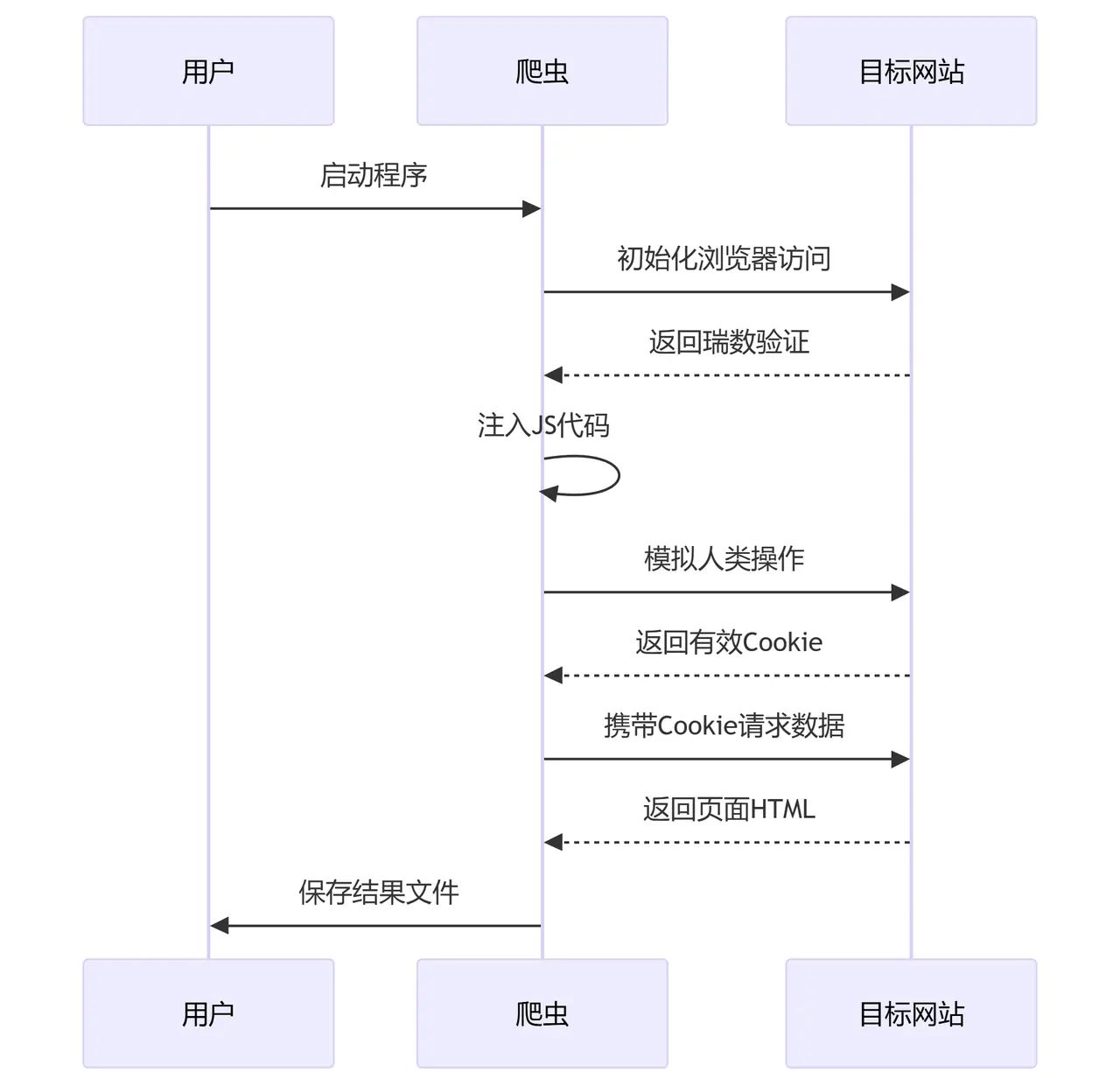
#异常处理方案
| 错误类型 | 触发条件 | 解决方案 |
|---|---|---|
| 瑞数验证失败 | 检测到自动化特征 | 1. 增加等待时间 2. 更新反检测JS |
| 412错误 | 请求头不完整 | 1. 补全Referer 2. 添加X-Requested-With头 |
| 连接重置 | IP被封禁 | 1. 启用代理IP 2. 降低请求频率 |
| 证书验证失败 | HTTPS拦截 | 1. 禁用SSL验证 2. 安装目标证书 |
#可附加功能
- 代理管理
# 在浏览器初始化时添加
options = ChromiumOptions()
options.set_proxy('http://proxy_ip:port')
self.browser = ChromiumPage(options=options)- 性能监控
# 添加性能日志
start_time = time.time()
# 执行操作...
print(f"请求耗时:{time.time()-start_time:.2f}s")- 验证码处理
if "captcha" in response.text:
    from captcha_solver import solve
    captcha_code = solve(response.image)
self.browser.ele("#captcha-input").input(captcha_code)#执行说明
#环境要求
- Python 3.8+
- Chrome 100+ 版本
- DrissionPage 最新版
pip install DrissionPage pyautogui#执行命令
python spider.py输出结果:
开始绕过瑞数验证...
模拟人类操作...
获取页面数据...
成功获取受保护数据!
结果已保存到result.html#完整代码
import os
import time
import random
import ssl
import urllib.request
from urllib.error import URLError, HTTPError
from urllib.parse import urljoin, quote
from DrissionPage import ChromiumPage


class AntiAntiSpider:
    def __init__(self):
        # 初始化浏览器配置
        self.browser = ChromiumPage(timeout=15)
        self.browser.set.window.max()  # 最大化窗口

        # 目标URL
        self.target_url = "https://www.zs.cdut.edu.cn/xyzy.htm"

        # 反检测JS代码
        self.anti_detection_js = """
        // 禁用debugger
        window.debugger = function(){};
        Object.defineProperty(window, 'debugger', {get: function(){}, configurable: false});

        // 覆盖自动化检测属性
        Object.defineProperty(navigator, 'webdriver', {get: () => undefined});
        Object.defineProperty(window, 'navigator', {value: {webdriver: undefined}});

        // 删除浏览器自动化特征
        const propsToDelete = [
            'cdc_adoQpoasnfa76pfcZLmcfl_Array',
            'cdc_adoQpoasnfa76pfcZLmcfl_Object',
            'cdc_adoQpoasnfa76pfcZLmcfl_Promise',
            'cdc_adoQpoasnfa76pfcZLmcfl_Proxy',
            'cdc_adoQpoasnfa76pfcZLmcfl_Symbol'
        ];
        propsToDelete.forEach(prop => delete window[prop]);

        // 拦截含debugger的定时器
        const originalSetInterval = window.setInterval;
        window.setInterval = function(callback, delay) {
            if (callback.toString().includes('debugger')) {
                return 0;
            }
            return originalSetInterval(callback, delay);
        };
        """

    def simulate_human_behavior(self):
        """模拟人类操作行为"""
        # 随机滚动页面
        for _ in range(random.randint(2, 5)):
            scroll_px = random.randint(300, 800)
            self.browser.scroll.down(scroll_px)
            time.sleep(random.uniform(0.5, 1.5))

        # 随机点击页面空白处
        self.browser.ele("tag:body").click()
        time.sleep(random.uniform(1, 2))

    def bypass_ruishi(self):
        """处理瑞数安全验证"""
        try:
            # 首次访问触发瑞数验证
            self.browser.get(self.target_url)
            self.browser.run_js(self.anti_detection_js)

            # 等待瑞数验证完成(关键等待)
            self.browser.wait.load_start()
            time.sleep(5)  # 瑞数需要额外等待

            # 检查是否出现验证元素
            if "验证" in self.browser.title:
                raise Exception("瑞数验证触发,需要手动处理")

            return True

        except Exception as e:
            print(f"瑞数验证处理失败: {str(e)}")
            return False

    def get_cookies_dict(self):
        """获取cookies字典"""
        cookies = self.browser.cookies()
        return {cookie['name']: cookie['value'] for cookie in cookies}

    def create_request(self, url, cookies=None, headers=None):
        """创建urllib请求对象"""
        if headers is None:
            headers = {
                "Accept": "text/html,application/xhtml+xml,application/xml;q=0.9,image/webp,*/*;q=0.8",
                "Accept-Language": "zh-CN,zh;q=0.9",
                "Cache-Control": "no-cache",
                "Connection": "keep-alive",
                "Pragma": "no-cache",
                "Referer": self.target_url,
                "Sec-Fetch-Dest": "document",
                "Sec-Fetch-Mode": "navigate",
                "Sec-Fetch-Site": "same-origin",
                "Upgrade-Insecure-Requests": "1",
                "User-Agent": "Mozilla/5.0 (Windows NT 10.0; Win64; x64) AppleWebKit/537.36 (KHTML, like Gecko) Chrome/119.0.0.0 Safari/537.36"
            }

        req = urllib.request.Request(url, headers=headers)

        if cookies:
            cookie_str = "; ".join([f"{k}={v}" for k, v in cookies.items()])
            req.add_header("Cookie", cookie_str)

        return req

    def safe_urlopen(self, url, max_retries=3, timeout=30):
        """安全的urlopen封装,带重试机制"""
        cookies = self.get_cookies_dict()

        for i in range(max_retries):
            try:
                req = self.create_request(url, cookies=cookies)

                # 禁用SSL验证(仅用于测试环境)
                context = ssl._create_unverified_context()

                # 随机延迟(1-3秒)
                time.sleep(random.uniform(1, 3))

                # 发送请求
                with urllib.request.urlopen(req, timeout=timeout, context=context) as response:
                    return response.read().decode('utf-8')

            except (URLError, HTTPError) as e:
                print(f"尝试 {i + 1}/{max_retries} 失败: {str(e)}")
                if i < max_retries - 1:
                    continue
                raise Exception(f"所有 {max_retries} 次尝试均失败")

    def run(self):
        try:
            print("开始绕过瑞数验证...")
            if not self.bypass_ruishi():
                print("瑞数验证绕过失败")
                return None

            print("模拟人类操作...")
            self.simulate_human_behavior()

            print("获取页面数据...")
            html = self.safe_urlopen(self.target_url)

            print("成功获取受保护数据!")
            return html

        except Exception as e:
            print(f"发生错误: {str(e)}")
            return None
        finally:
            print("关闭浏览器...")
            self.browser.close()


if __name__ == "__main__":
    spider = AntiAntiSpider()
    result = spider.run()

    if result:
        with open("result.html", "w", encoding="utf-8") as f:
            f.write(result)
        print("结果已保存到result.html")
    else:
        print("数据获取失败")
import pandas as pd
from bs4 import BeautifulSoup
with open("result.html", "r", encoding="utf-8") as f:
html_content = f.read()
# 解析HTML
soup = BeautifulSoup(html_content, 'html.parser')
# 准备存储数据的列表
data = []
# 提取每个学院的li标签
for li in soup.find_all('li', class_='li1'):
# 提取学院名称 (h6标签内的i标签)
h6 = li.find('h6')
if h6:
college_name = h6.find('i').text.strip()
# 提取该学院下的所有专业信息
for dd in li.find_all('dd'):
a_tag = dd.find('a')
if a_tag:
major_name = a_tag.text.strip()
major_url = a_tag['href']
major_title = a_tag.get('title', '').strip()
data.append({
'学院名称': college_name,
'专业名称': major_name,
'专业标题': major_title,
'专业链接': major_url
})
# 创建DataFrame
df = pd.DataFrame(data)
# 保存到Excel文件
excel_file = '学院专业信息.xlsx'
with pd.ExcelWriter(excel_file, engine='openpyxl') as writer:
df.to_excel(writer, index=False)
print(f'学院和专业信息已成功保存到 {excel_file}')#实现效果